

Search for a Booking.com promo code and you will find dozens of sites listing codes. Booking.com works differently from most shops, though. It does have a promo code box, but the codes that work in it come from Booking.com itself and its reward partners, and the biggest savings on Booking.com need no code at all. This guide explains exactly where Booking.com promo codes and coupon codes go, why copied codes fail, and the discounts that beat any code, with every rule taken from Booking.com's own pages.
For the live list of Booking.com offers we track, including current deals, see our Booking.com coupons and deals page.

Save on your next Booking.com stay
10% off with free Genius · 15%+ off Late Escape Deals
- ✓Genius discounts apply automatically when you sign in
- ✓Late Escape Deals: stays Oct 1, 2026 – Jan 7, 2027
Do Booking.com promo codes exist?
Yes. There are three different things people mean by a Booking.com code, and they work in three different ways:
- Reward codes and unique links. Booking.com and its partners send these by email or as a unique link. You enter a code with your payment details on the Final Details page, or open the link and the reward activates when you land on the site.
- Travel coupon codes. Booking.com's reward partners award these, usually in an email. You redeem them on Booking.com's travel coupon page and they become Travel Credits in your Booking.com Wallet.
- Codes on coupon sites. These are the ones that usually fail. Booking.com's affiliate terms say it does not provide voucher codes to customers, and they forbid affiliate sites from listing discount vouchers. That is why SaversPrice does not list Booking.com codes, and why any code you copy from a coupon site is not one Booking.com publishes.
Where to enter a Booking.com promo code
The promo code box is on the last page before you book, the Final Details page, right next to your payment details. Here is how to use it:
- Sign in before you search. Genius discounts only show to signed-in members, so you will see the real price straight away.
- Choose your stay and continue to the page where you add guest and payment details.
- Find "Do you have a promo code?" next to the payment form, type the code exactly as it was sent to you, and press Apply.
- Check that it worked before you confirm. Booking.com shows an active offer as a ribbon at the top or bottom of the site and/or an active code on the left of the Final Details page. An instant discount appears in the price breakdown.
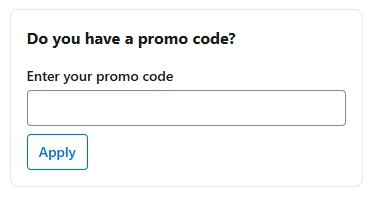
Using the app? Enter the code with your payment details in the same way. For some offers, the app asks you to go to My coupon codes in the main menu and enter the code there instead.
How to redeem a Booking.com coupon code for Travel Credits
Travel coupon codes do not go in the promo code box. They turn into Travel Credits, which you then spend like money on an eligible booking:
- Find the code in your award email from the reward partner. Check your spam folder if it is not in your inbox, and contact the partner that issued it if you still cannot find it.
- Redeem it on Booking.com's travel coupon page. Only your email address is needed for this step.
- Sign in with the same email address. You need a Booking.com account with that email to spend the Credits. They can take up to 10 minutes to appear in your Wallet.
- Pay with your Wallet at the payment stage, then choose another payment method for whatever is left. Only properties with the "Pay with Wallet" badge accept it.
Travel Credits can be spent on select stays and flights, and on any car rental, attraction and taxi booking paid in advance, plus insurance added through Booking.com. They cannot be used on a booking you have already made, and their expiry date depends on the reward, so check your Rewards activity.
Booking.com promo code not working? The usual reasons
When a code is refused, it is almost always one of these, all taken from Booking.com's own reward rules:
- It came from a coupon site. Booking.com's affiliate terms say it does not provide voucher codes to customers, so a code posted on a coupon site is not one Booking.com publishes.
- It has expired. The expiry date is set when the code or link is sent to you.
- It is restricted. Booking.com's terms allow codes that only work in the app, need a minimum spend, have a maximum value or only work at specific properties.
- It needs "Pay now". Instant-discount rewards are only applied if you pay at booking, and not every property offers that option.
- You are applying it to an existing booking. Rewards cannot be applied retroactively, only to new bookings.
- The booking already has a reward. Booking.com allows one reward per booking.
- The booking was cancelled. If you cancel a booking made with a reward, its value is lost and the code or link cannot be reused.
The discount that beats any code: Booking.com Genius
Genius is Booking.com's free loyalty program, and for most travellers it is worth more than any promo code. Creating an account unlocks Level 1 immediately, the discount is applied automatically to participating properties (marked with a blue Genius label), and Booking.com never moves you down a level once you reach it.
Booking.com Genius: 10% off from your first stay
Free to join, no code needed
- ✓Up to 20% off stays at Genius Level 3
- ✓Free breakfasts and room upgrades at select stays from Level 2
| Level | How to unlock it | Stays | Rental cars | Extras |
|---|---|---|---|---|
| Genius Level 1 | Create a free account | 10% off | 10% off | Flight price alerts in the app |
| Genius Level 2 | 5 bookings within 2 years | 10–15% off | 10–15% off | Free breakfasts and room upgrades at select stays |
| Genius Level 3 | 15 bookings within 2 years | 10–20% off | 10–15% off | Free breakfasts, room upgrades and priority support on all stays |
A few details worth knowing:
- Discounts on stays are applied to the price before taxes and fees; on rental cars they apply to the cost of the car only.
- Genius discounts are available at 850,000 participating properties worldwide, not at every property.
- Every completed stay, flight, rental car, taxi and attraction booking counts toward your next level, and each reservation counts as one booking however many nights or rooms it covers.
- Cruises, insurance, public transit, ride hailing, free options and extras such as room upgrades or extra luggage do not count.
- A higher level does not always mean a bigger discount: percentages vary by property, and some properties give every level the same discount.
- If your level looks different on your phone and your computer, make sure you are signed in to the same account on both.
Booking.com deals running right now
Late Escape Deals: 15% or more off end-of-year stays
Booking.com's current campaign takes at least 15% off, and sometimes more, at participating properties worldwide. Late Escape Deals can be booked until January 7, 2027 for stays between October 1, 2026 and January 7, 2027, and the discount is applied to the price before taxes and fees. Search for your destination and dates, and participating properties are included in your results.

Late Escape Deals: 15% or more off end-of-year stays
Book by January 7, 2027
- ✓Stays between Oct 1, 2026 and Jan 7, 2027
- ✓Participating properties worldwide, before taxes and fees
Seasonal and holiday deals
Booking.com keeps seasonal deal pages for Black Friday, Thanksgiving, Christmas and winter holidays. The discount and dates are set per campaign, so check them when the season starts. We add each live Booking.com campaign to our Booking.com page once it is announced.
Mobile-only rates
Some properties set a lower rate that only shows in the Booking.com app, or in the app and mobile browser, marked with a badge. Not every property offers one, so it is worth comparing the app with the website for the stay you want.
What stacks with what
- One reward per booking. You can only use one promo reward on a booking, but Booking.com says it can be combined with Genius discounts and Booking.com deals.
- Genius plus deals. In many cases your Genius discount combines with other applicable discounts, offers and deals, and the eligibility is shown before you book. The price you see may already reflect several discounts at once.
- Partner offers stand alone. Stays marked "Partner offer" must be paid when you book, cannot be changed, and cannot be combined with any other promotions, incentives or rewards.
We Price Match: how to get the difference back
If, after booking, you find the same stay cheaper on another website, Booking.com promises to refund the difference. To qualify, the other offer must be for:
- the same property and accommodation type;
- the same check-in and check-out dates;
- the same cancellation policy and conditions;
- the same number of guests.
To claim, look for Found this room cheaper elsewhere? on your confirmation page, save the link to the cheaper offer, take screenshots showing all the details, and contact Customer Service by email or phone. The other offer must still be online when Booking.com checks it. If the claim is accepted, Booking.com either amends your reservation price or explains how to claim the difference after your stay.
The price match does not apply to prices that need a login, a loyalty membership or a coupon code; to sites that hide the property until after you book; to Partner offers; to cancelled bookings; or to single-unit properties. Booking.com makes the final decision on eligibility.
Cashback rewards: when the money arrives
Some Booking.com rewards are paid back to you after your trip rather than taken off the price. Booking.com verifies them after you check out and pays them 30 to 60 days after check-out, either to your card or as travel credit in your Wallet, with a confirmation email. Card rewards can go to a Visa, Mastercard or China UnionPay card (Visa and Mastercard debit cards work too), but not American Express.
Ready to book your stay?
Genius and Late Escape discounts apply automatically
- ✓Sign in first to see your Genius price
- ✓One promo reward per booking stacks with both
More ways to pay less on Booking.com
- Always sign in before searching, and use the same account on every device.
- Look for the blue Genius label and the Late Escape Deals badge in search results.
- Save your one reward per booking for your most expensive stay, since it stacks with Genius and deals.
- Choose "Pay now" when you have an instant-discount reward.
- Compare the final total, not just the headline rate: discounts come off the price before taxes and fees.
- Keep the link and a screenshot if you spot your booked room cheaper elsewhere, for a We Price Match claim.
Comparing travel sites?
We also track offers for other travel sites, so you can compare before you book: Expedia, Hotels.com, Agoda, Hostelworld, Vrbo and Airbnb.
Sources
Every rule in this guide comes from Booking.com's own pages, read on October 11, 2026: the Genius program page and FAQ, the Late Escape Deals page, the travel coupons page, the rewards FAQ, Booking.com's customer terms (We Price Match, Genius, Rewards and Wallet) and its mobile rates page for properties. Booking.com changes its programs from time to time, so check the current terms before you book.
SaversPrice may earn a commission when you book through our links, at no extra cost to you. It does not change the price you pay or which deals we include.
Today's Booking.com codes and deals
The top offers from our Booking.com page, ranked the same way.

Late Escape Deals: 15% or more off end-of-year stays
Book by January 7, 2027 for stays between October 1, 2026 and January 7, 2027 at participating properties worldwide. The discount applies to the price before taxes and fees.
Genius Level 3: up to 20% off stays, plus free breakfasts and room upgrades
Level 2 unlocks after 5 bookings in 2 years (10–15% off, free breakfasts and room upgrades at select stays); Level 3 after 15 bookings in 2 years (10–20% off and priority support).
Genius Level 1: 10% off select stays with a free Booking.com account
Create a free account and sign in to get 10% off participating stays and select rental cars, applied automatically before taxes and fees. No code needed.
Put these savings to work
Browse thousands of verified coupons and promo codes from hundreds of top stores.
Alexandra Skakowska
VerifiedLead Coupon Editor, SaversPrice
Alexandra leads coupon verification at SaversPrice. Codes confirmed on the retailer’s own site carry a green Verified badge, and nothing else is dressed up as checked. When 6,000 stale coupons failed that test, they were deleted. If a code stops working, it comes down.


