











 Shopping Guides


Parallels Coupons & Promo Codes
5 verified offersAs of October 27, 2026
 Reviewed by SaversPrice TeamHow we check codes
When you buy through links on SaversPrice we may earn a commission. SaversPrice is an independent website and is not affiliated with, endorsed by, or sponsored by Parallels; brand names and logos are trademarks of their respective owners.
Top Parallels Deals & Discounts for October 27, 2026
Browse all 5 active deals
Deal
62%OFF
Top OfferParallels Verified
Upgrade to Parallels Desktop 27: Save Up to 62%
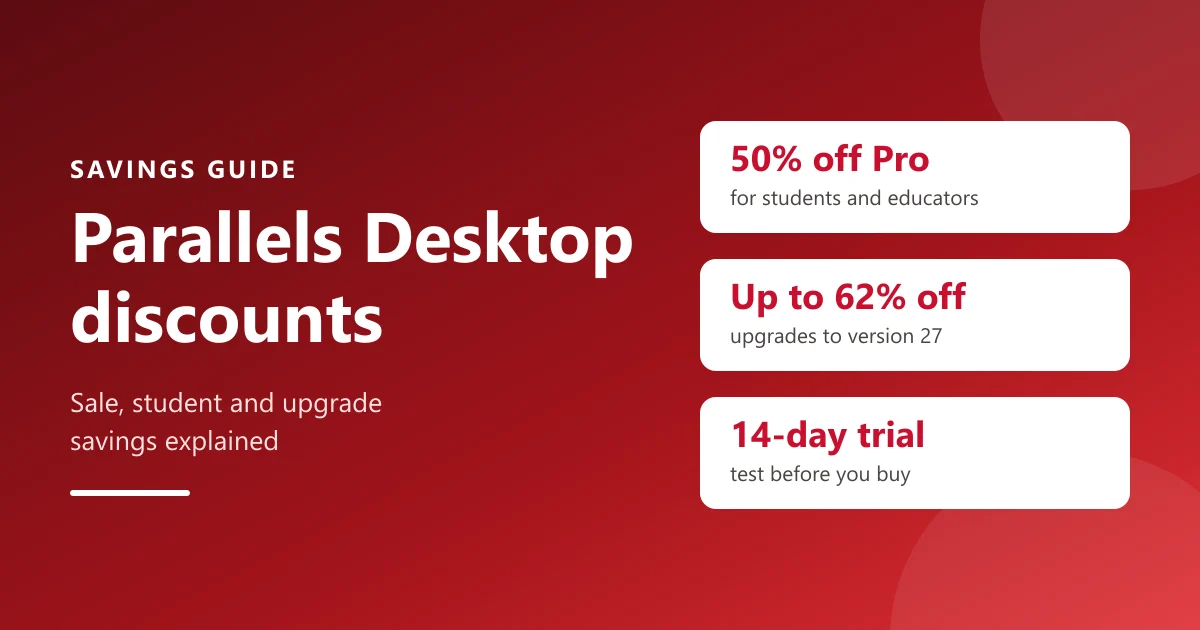
Owners of earlier versions can upgrade at a discount instead of buying a new license. Parallels' upgrade page showed 62% off the Pro upgrade and 56% off the Standard one.
Checked Oct 23
DealParallels Verified
50%OFF
Students, Educators and Parents: 50% Off Parallels Desktop Pro
Verify your academic status at checkout and the 50% applies with no coupon needed.
Checked Oct 23
DealParallels Verified
45%OFF
Parallels Desktop 27 Launch Sale: 45% Off Standard and Pro Edition
Parallels' buy page showed SAVE 45% on Standard (yearly subscription or one-time purchase) and on Pro (subscription). Select Buy now and the cart shows the price before discount and what you save. Savings can vary by country.
Checked Oct 23
DealParallels Verified
35%OFF
Parallels Desktop Business Edition: 35% Off
Everything in Pro plus central license management and deployment tools for teams, applied automatically at checkout.
Checked Oct 23
DealParallels Verified
OFFER
Free 14-Day Parallels Desktop Pro Trial
Enter your email on Parallels' trial page to download it and test your own Windows apps for 14 days; the trial is Pro Edition.
Checked Oct 23
Parallels Hints & Tips
- Start with the 14-day free trial and test the exact Windows apps you need before you buy.
- Student, teacher or parent of a student? Verify at checkout for 50% off Pro Edition; it renews each year while you stay eligible.
- Own an older perpetual license? Buy the discounted upgrade instead of a new license.
- Subscribers do not need to upgrade: an active subscription moves to the newest version at no extra cost.
- Everyday use like Microsoft Office? Standard is enough: it allows 8 GB vRAM and 4 vCPUs per virtual machine.
- Running CAD, data or developer tools? Pro raises the limits and runs several virtual machines at once.
- Prefer to pay once? Standard is the only edition sold as a one-time purchase; Pro and Business are subscriptions.
- Budget for Windows: a Windows license is not included, though one you already own may work.
- Each license covers one Mac, so count your Macs before you buy.
- Buy directly on parallels.com: only those purchases get the 30-day money-back guarantee.
- Sale discounts apply automatically through Parallels' buy links, so check the saving in the cart before you pay.
- Buying 10 or more licenses? Contact Parallels about volume and Enterprise options.
In short: As of October 27, 2026, there are 5 Parallels offers (5 deals) on this page, and the top discount is 62% off.
Parallels at a glance
- What it is
- Parallels Desktop runs Windows, Linux and other systems on a Mac, side by side with macOS
- Current version
- Parallels Desktop 27
- Editions
- Standard, Pro and Business, plus Enterprise through sales
- Standard
- 8 GB vRAM and 4 vCPUs per virtual machine; yearly subscription or one-time purchase
- Pro
- up to 128 GB vRAM and 32 vCPUs per VM on Intel Macs (62 GB and 18 vCPUs on Apple silicon); subscription only
- Business
- adds centralized administration, license management and volume licensing
- Students, educators and parents
- 50% off Pro Edition, verified at checkout
- Free trial
- 14 days of Pro Edition
- Money-back guarantee
- 30 days on initial purchases from parallels.com
- Windows license
- not included, needed to activate Windows
- Microsoft
- the authorized solution for Windows 11 on Apple silicon Macs
- Support
- unlimited phone and email with subscriptions, plus 24/7 chat; 30 days with the one-time Standard license
- Checkout
- run by Cleverbridge GmbH, Parallels' online reseller
- Category
- Productivity Apps
- Live offers
- 5 offers
- Offers as of
- October 27, 2026
- Offer types
- 5 deals
- Best discount
- 62% OFF
- Discount range
- 35%–62% off
- Verified badge
- Marks codes confirmed on the store's own site
Parallels Deals Compared for October 27, 2026
The 5 best Parallels offers, ranked by what's working, as of October 27, 2026.
| Code | Discount | Parallels Offer | Expires |
|---|---|---|---|
| No code needed | 62% OFF | Upgrade to Parallels Desktop 27: Save Up to 62% | Ongoing |
| No code needed | 50% OFF | Students, Educators and Parents: 50% Off Parallels Desktop Pro | Ongoing |
| No code needed | 45% OFF | Parallels Desktop 27 Launch Sale: 45% Off Standard and Pro Edition | Ongoing |
| No code needed | 35% OFF | Parallels Desktop Business Edition: 35% Off | Ongoing |
| No code needed | Sale | Free 14-Day Parallels Desktop Pro Trial | Ongoing |
How Parallels discounts are applied
Parallels' checkout has no box for typing a promo code. Its sale prices are attached to the Buy now links on its buy page, and the cart shows the regular price, the discount and what you save before you pay. The student discount is applied after you verify your academic status at checkout.
No code box: the discount comes with the buy link and shows in the cart. Open Parallels' buy page, pick Standard, Pro or Business and select Buy now. The checkout opens with your edition in the shopping cart, showing the unit price, the price before discount and a "You Save" amount. Students, educators and parents choose the Students option and verify their status at checkout; the 50% then applies automatically.
- 1
Open Parallels' buy page from this page
Sales are announced at the top of the page; in October 2026 the banner read "Save up to 45%".
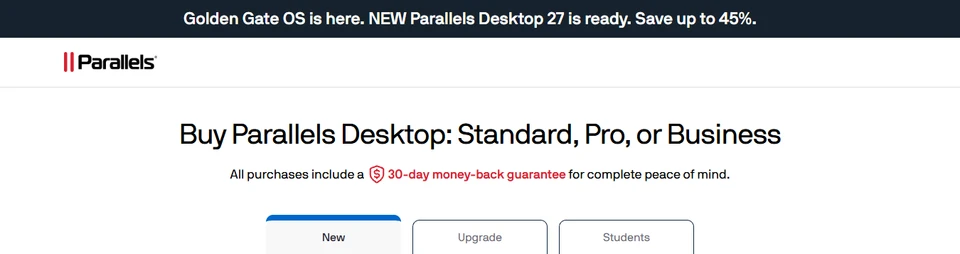
Parallels' buy page during the version 27 launch sale (screenshot, October 2026). - 2
Choose New, Upgrade or Students
New is for first-time buyers, Upgrade for owners of an older version, and Students for the 50% education price.
- 3
Pick your edition
Each edition shows its current saving, such as SAVE 45% on Pro Edition.
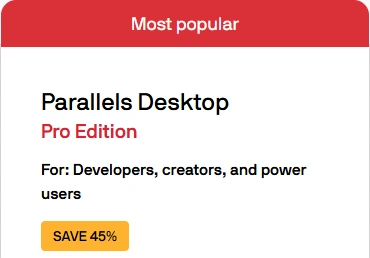
Parallels' Pro Edition card with its sale label (screenshot, October 2026). - 4
Check the saving in the cart, then pay
The checkout lists the price before discount and the amount you save. Pay by card, PayPal or wire transfer.
About Parallels
Parallels makes Parallels Desktop, the software that runs Windows, Linux and other operating systems on a Mac without restarting, so Windows-only apps sit next to your Mac apps. It has been available since 2006, runs natively on Apple silicon Macs from M1 to M5, and is the solution Microsoft authorizes for running Windows 11 on Apple silicon. The current version is Parallels Desktop 27.
There are three main editions. Standard covers everyday use, with 8 GB of virtual memory and 4 virtual CPUs per virtual machine, and is the only edition sold as a one-time purchase as well as a yearly subscription. Pro, for developers, creators and power users, raises those limits to as much as 128 GB and 32 vCPUs, adds a command line interface and runs several virtual machines at once. Business adds central license management and deployment tools for teams. Subscriptions include every update while they are active, and eligible subscriptions include Parallels Toolbox.
You can save on Parallels in four ways: its seasonal sales, which apply automatically through its buy links, 50% off Pro Edition for verified students, educators and parents, discounted upgrades for owners of older versions, and a 14-day free trial before you pay anything. Purchases made directly on parallels.com come with a 30-day money-back guarantee. This page lists today's Parallels offers, with every detail taken from Parallels' own site.
We're currently tracking 5 live Parallels offers (5 deals). The top saving on offer today is 62% off.
Right now this page lists 5 deals, the largest being 62% off.
What to expect from Parallels promo codes
- No-code deals — 5 offers with no code to enter: open one to shop it on Parallels's site.
- Discount range — Parallels codes here run up to 62% off, averaging around 48%.
How to save money at Parallels
- 1Open a live Parallels deal above to shop it on Parallels's site; deals have no code to enter.
- 2Percentages on this page span 35% to 62% off — start with the largest and work down, since the biggest discount often carries the strictest conditions.
- 3Compare the offers above before you buy — a percentage-off code usually beats a fixed-amount one as your Parallels total grows.
Parallels discount stats
5
Total offers
5
Online deals
62% OFF
Top discount
Across this page we're listing 5 live Parallels offers — 5 deals. The largest active discount is 62% off, and the average percentage discount across all Parallels codes is around 48% off.
Why trust SaversPrice?
5 of the 5 Parallels offers on this page were read from Parallels's own site and carry a Verified badge. Discounts here run from 35% to 62% off, ranked by what shoppers report is working.
Parallels Coupon FAQs
Common questions about saving with Parallels promo codes
Parallels' checkout has no box for typing a code: its sale discounts are attached to its buy links and show as a saving in the cart. The biggest savings right now are the Parallels Desktop 27 launch sale, 50% off Pro for students and educators, and discounted upgrades, all listed at the top of this page.
Parallels runs its sales through its buy page rather than codes; in October 2026 that was the Parallels Desktop 27 launch sale at up to 45% off. When a Black Friday or holiday offer is live, it appears at the top of this page with its saving.
In October 2026 Parallels was running a launch sale for Parallels Desktop 27, advertised as "Save up to 45%". Its store showed 45% off Standard and Pro Edition and 35% off Business Edition. Savings and prices can vary by country.
Yes. Students, educators and parents of students get 50% off Parallels Desktop Pro Edition. You verify your academic status at checkout, the discount applies automatically with no coupon needed, and it renews every year while you remain eligible.
Current and newly accepted students, faculty and staff at accredited colleges and universities, and parents buying for a student. You need your student or faculty ID, and Parallels says verification takes under five minutes.
Yes. The same 50% education offer applies to teachers, professors and school staff, and it renews annually once you are verified.
Prices depend on your country and appear in your local currency on Parallels' buy page. Standard is sold as a yearly subscription or a one-time purchase, while Pro and Business are yearly subscriptions. During the Parallels Desktop 27 launch sale the store showed 45% off Standard and Pro and 35% off Business.
Yes, for Standard Edition. A perpetual license lets you keep using the version you bought indefinitely, while a subscription includes ongoing feature updates and unlimited support. Pro and Business are available only as yearly subscriptions. Parallels notes that a one-time license covers the current version only, and full compatibility with future versions is not guaranteed.
Yes. Parallels offers a 14-day free trial: enter your email address on its trial page to download it, then test the Windows apps you actually use before deciding.
With an active subscription, your license moves to the latest version at no extra cost. If you own a perpetual license from an earlier version, you can buy an upgrade at a discount instead of a new license; Parallels' upgrade page advertised savings of up to 62% in October 2026.
Standard allows up to 8 GB of virtual memory and 4 virtual CPUs per virtual machine, enough for everyday Windows use such as Microsoft Office. Pro raises that to up to 128 GB and 32 vCPUs on Intel Macs (62 GB and 18 vCPUs on Apple silicon), adds a command line interface and developer tools, and runs multiple virtual machines at once.
Everything in Pro plus centralized administration and license management, automated CI/CD workflows, provisioning through Mac management tools and volume licensing. For 10 or more licenses, Parallels invites you to contact it about extra benefits and Enterprise options.
You do not need one to buy Parallels Desktop, but you need one to activate Windows. A Windows license is not included and can be bought from Microsoft; one you already own may work depending on its type and terms.
Each license covers one Mac, so you need a separate license for each Mac you use.
Yes. It runs natively on M1, M2, M3, M4 and M5 Macs, and Microsoft authorizes it for running Arm versions of Windows 11 Pro and Enterprise on Apple silicon.
Yes. It supports Intel Macs running macOS Catalina (10.15) or later and handles the Windows 11 TPM 2.0 requirement through virtualization, so Boot Camp is not needed.
macOS Catalina (10.15) or later on Intel Macs, and macOS Big Sur (11) or later on Apple silicon Macs.
Yes. Initial purchases made on parallels.com come with a 30-day money-back guarantee, so you can request a refund during your first month. Purchases from a retailer or reseller follow that seller's return policy instead.
Yes. Parallels subscriptions renew yearly, and the checkout says you can cancel at any time, effective at the end of the current subscription term.
Standard and Pro subscriptions include unlimited phone and email support, and subscribers can reach 24/7 chat support. The one-time Standard license includes 30 days of support. Business and Enterprise add administration and deployment controls for IT teams.
Feature updates and new versions while the subscription is active, support, and, on eligible subscriptions, Parallels Toolbox, a set of 50+ small productivity tools for tasks such as disk cleanup, screen capture and downloads.
Yes. Parallels Desktop runs Linux and macOS in virtual machines as well as Windows, and Pro can run, for example, Windows 11 and a Linux distribution such as Ubuntu at the same time.
Yes. Parallels says students and professionals use it for Windows-only apps such as SOLIDWORKS, Revit, ArcGIS and Power BI on a Mac, with Pro recommended for graphics-heavy or demanding programs.
Parallels' trial page describes it as a free Parallels Desktop Pro trial, so you can test demanding apps such as large CAD models or long builds as well as everyday software.
Yes. Buy a Pro license and enter the new activation key in the app, and the extra performance and tools unlock straight away.
Yes. Parallels says you can set up a Windows virtual machine in Parallels Desktop Pro and install AutoCAD inside it, keeping a dedicated Windows environment for CAD work on your Mac.
Parallels says QA engineers keep separate virtual machines for different Windows versions or builds on one Mac, and use snapshots to save a clean machine before a test and roll back afterwards.
Parallels Desktop 27 is the version for macOS Golden Gate, and subscriptions include free updates to new versions and patches. Parallels also lists full compatibility with macOS 26 Tahoe.
Parallels' buy page lists 30 days of phone and email support for the one-time Standard license (its upgrade page says 30-day email support), with newer versions as paid upgrades. Subscriptions include unlimited phone and email support and free updates to new versions.
Yes. Educators can request multiple seats or academic licenses through their Parallels Desktop dashboard, and schools can use Business or Enterprise Edition for volume licensing and central management; for 10 or more licenses, Parallels asks you to contact it about volume licensing and Enterprise options.
Parallels' online store is run by its reseller Cleverbridge GmbH: the checkout states that the order process is conducted by Cleverbridge. It offered credit card, PayPal and wire transfer.
Yes. Parallels Desktop has been available since 2006, is used by individuals, schools and businesses, and is Microsoft's authorized solution for Windows 11 on Apple silicon Macs. Parallels International GmbH publishes it.
We may earn a commission when you buy through links on our site, at no extra cost to you.
As of October 27, 2026, there are 5 Parallels offers available — 5 deals, with discounts up to 62% off. They are all listed above.
Only the education discount: you verify your academic status at checkout. Sale and upgrade prices are already attached to the buy links.
Parallels shows prices in your local currency, and the checkout adds any local tax, so the amount can differ from country to country. The percentage saving is shown on each edition.
Parallels Tips & Comments
Have a Parallels tip or did a code work for you? Share it with other shoppers.
No comments yet — be the first to share a Parallels tip!
Savings guides & tips
Expert guides from the SaversPrice team to help you save even more — on Parallels and everywhere else.

Popular stores & categories
Abelssoft CouponsABBYY CouponsClaude CouponsEvernote CouponsSlack CouponsVisual Studio CouponsDiscord CouponsAsana CouponsTrello CouponsNotion CouponsClickUp CouponsComputers & PC Hardware Promo CodesProductivity Apps Promo CodesPharmacy & Health Promo CodesCreative Software Promo CodesCar Rental Promo CodesJewelry & Watches Promo CodesOnline Marketplace Promo CodesAntivirus Software Promo Codes