



 Shopping Guides


Panda Security Coupons & Promo Codes
14 verified offersAs of October 30, 2026
 Ethan Caldwell, SaversPrice Editorial TeamHow we check codes
When you buy through links on SaversPrice we may earn a commission. SaversPrice is an independent website and is not affiliated with, endorsed by, or sponsored by Panda Security; brand names and logos are trademarks of their respective owners.
Top Panda Security Deals & Discounts for October 30, 2026
Browse all 14 active deals
Deal
60%OFF
Top OfferPanda Security Verified
60% Off All Panda Dome Plans
Checked Oct 30Ends Oct 31, 2026
Need to know
Panda's offer page takes 60% off Essential, Advanced, Complete and Premium, with no code to enter. In the US, 1 device for 1 year is $21.98 for Essential, $25.98 for Advanced, $39.98 for Complete and $61.98 for Premium.
Expires Oct 31, 2026 · Added Oct 30, 2026
Terms and Conditions
- Applies to all four plans: Essential, Advanced, Complete and Premium.
- The 60% shows on every device and year choice on the page.
- The offer page shows it in the US, Canada, Australia and Spain; the UK and Brazil see other prices.
- These are US prices; other countries see their own currency.
- No code needed. The link takes you straight to the offer at Panda Security.
- Panda Security sets the final terms and can change or end this offer at any time.
DealPanda Security Verified
60%OFF
Renew Panda Dome: 60% Off for Existing Customers
Checked Oct 30Ends Oct 31, 2026
Need to know
Panda's renewal page shows a 60% Halloween offer for home users who already have a plan.
Expires Oct 31, 2026 · Added Oct 30, 2026
Terms and Conditions
- For existing Panda Security customers.
- Applies to home users renewing a Panda plan.
- Compare the price with the offer page before you pay.
- No code needed. The link takes you straight to the offer at Panda Security.
- Panda Security sets the final terms and can change or end this offer at any time.
DealPanda Security Verified
60%OFF
Panda Dome Premium: $61.98 for 1 Year
Checked Oct 30Active offer
Need to know
Was $154.95. The full range, including unlimited VPN Premium, Dark Web Monitor, an update manager and technical support 24 hours a day.
Active offer, no end date published · Added Oct 30, 2026
Terms and Conditions
- Applies to Panda Dome Premium for 1 device for 1 year.
- You can choose up to 10 devices or unlimited, for up to 3 years.
- These are US prices; other countries see their own currency.
- No code needed. The link takes you straight to the offer at Panda Security.
- Panda Security sets the final terms and can change or end this offer at any time.
DealPanda Security Verified
58%OFF
Panda Dome Complete: Under $42 for 1 Year
Checked Oct 30Active offer
Need to know
Was $99.95. Adds a password manager, CleanUp and file encryption to everything in Advanced.
Active offer, no end date published · Added Oct 30, 2026
Terms and Conditions
- Applies to Panda Dome Complete for 1 device for 1 year.
- You can choose up to 10 devices or unlimited, for up to 3 years.
- These are US prices; other countries see their own currency.
- No code needed. The link takes you straight to the offer at Panda Security.
- Panda Security sets the final terms and can change or end this offer at any time.
DealPanda Security Verified
55%OFF
Panda Dome Advanced: Under $30 for 1 Year
Checked Oct 30Active offer
Need to know
Was $64.95. Adds ransomware protection, parental control for Windows and identity protection to everything in Essential.
Active offer, no end date published · Added Oct 30, 2026
Terms and Conditions
- Applies to Panda Dome Advanced for 1 device for 1 year.
- You can choose up to 10 devices or unlimited, for up to 3 years.
- These are US prices; other countries see their own currency.
- No code needed. The link takes you straight to the offer at Panda Security.
- Panda Security sets the final terms and can change or end this offer at any time.
DealPanda Security Verified
55%OFF
Panda Dome Essential: Under $25 for 1 Year
Checked Oct 30Active offer
Need to know
Was $54.95. Antivirus and a firewall for Windows, real-time protection for Mac and Android, Wi-Fi protection and a VPN with 150 MB a day.
Active offer, no end date published · Added Oct 30, 2026
Terms and Conditions
- Applies to Panda Dome Essential for 1 device for 1 year.
- You can choose up to 10 devices or unlimited, for up to 3 years.
- These are US prices; other countries see their own currency.
- No code needed. The link takes you straight to the offer at Panda Security.
- Panda Security sets the final terms and can change or end this offer at any time.
DealPanda Security Verified
60%OFF
Panda Dome Premium for 5 Devices: $73.98 for 1 Year
Checked Oct 30Active offer
Need to know
Was $184.95. Premium's unlimited VPN covers up to 5 devices, so this size puts it on all of them.
Active offer, no end date published · Added Oct 30, 2026
Terms and Conditions
- Applies to Panda Dome Premium for 5 devices for 1 year.
- These are US prices; other countries see their own currency.
- No code needed. The link takes you straight to the offer at Panda Security.
- Panda Security sets the final terms and can change or end this offer at any time.
DealPanda Security Verified
55%OFF
Panda Dome Essential for 5 Devices: Under $35 for 1 Year
Checked Oct 30Active offer
Need to know
Was $74.95. Covers a mix of Windows, Mac, Android and iOS devices in one household.
Active offer, no end date published · Added Oct 30, 2026
Terms and Conditions
- Applies to Panda Dome Essential for 5 devices for 1 year.
- These are US prices; other countries see their own currency.
- No code needed. The link takes you straight to the offer at Panda Security.
- Panda Security sets the final terms and can change or end this offer at any time.
DealPanda Security Verified
55%OFF
Panda Dome Essential for Unlimited Devices: Under $60
Checked Oct 30Active offer
Need to know
Was $129.95 for 1 year. Panda says unlimited devices are subject to reasonable home use, for one customer in one household.
Active offer, no end date published · Added Oct 30, 2026
Terms and Conditions
- Applies to Panda Dome Essential for unlimited devices for 1 year.
- Unlimited is for reasonable home use by one customer in one household.
- These are US prices; other countries see their own currency.
- No code needed. The link takes you straight to the offer at Panda Security.
- Panda Security sets the final terms and can change or end this offer at any time.
DealPanda Security Verified
40%OFF
VPN Premium: 40% Off, $32.97
Checked Oct 30Active offer
Need to know
Was $54.95. Panda's VPN on its own, with unlimited data and more than 60 virtual locations on up to 5 devices.
Active offer, no end date published · Added Oct 30, 2026
Terms and Conditions
- Applies to 1 year of VPN Premium.
- These are US prices; other countries see their own currency.
- No code needed. The link takes you straight to the offer at Panda Security.
- Panda Security sets the final terms and can change or end this offer at any time.
DealPanda Security Verified
25%OFF
Panda Dome Family: 25% Off, $27.34
Checked Oct 30Active offer
Need to know
Was $36.45. Parental control to block or limit apps, set time limits, get location alerts and find your children's devices.
Active offer, no end date published · Added Oct 30, 2026
Terms and Conditions
- Applies to 1 year of Panda Dome Family.
- These are US prices; other countries see their own currency.
- No code needed. The link takes you straight to the offer at Panda Security.
- Panda Security sets the final terms and can change or end this offer at any time.
DealPanda Security Verified
25%OFF
CleanUp: 25% Off, $35.59
Checked Oct 30Active offer
Need to know
Was $47.45. Deletes unnecessary files and speeds up Windows start-up. Also part of Complete and Premium.
Active offer, no end date published · Added Oct 30, 2026
Terms and Conditions
- Applies to 1 year of CleanUp.
- These are US prices; other countries see their own currency.
- No code needed. The link takes you straight to the offer at Panda Security.
- Panda Security sets the final terms and can change or end this offer at any time.
DealPanda Security Verified
20%OFF
Password Manager: 20% Off, $31.96
Checked Oct 30Active offer
Need to know
Was $39.95. Stores your passwords behind one master password so you can use a different one for each service. Also part of Complete and Premium.
Active offer, no end date published · Added Oct 30, 2026
Terms and Conditions
- Applies to 1 year of Password Manager.
- These are US prices; other countries see their own currency.
- No code needed. The link takes you straight to the offer at Panda Security.
- Panda Security sets the final terms and can change or end this offer at any time.
DealPanda Security Verified
OFFER
Free Antivirus for Windows and Android
Checked Oct 30Active offer
Need to know
Panda's free antivirus covers 1 device and comes with a VPN limited to 150 MB a day.
Active offer, no end date published · Added Oct 30, 2026
Terms and Conditions
- Applies to 1 Windows or Android device.
- The VPN is limited to 150 MB a day.
- No code needed. The link takes you straight to the offer at Panda Security.
- Panda Security sets the final terms and can change or end this offer at any time.
In short: As of October 30, 2026, the top Panda Security discount confirmed on Panda Security's own site is 60% off. No code to type: the offer page applies the discount.
Panda Security at a glance
- What it is
- Antivirus and privacy software for home users, sold as Panda Dome
- Founded
- 1990, in Spain
- Based in
- Bilbao, Spain
- Brand
- Panda Security, a WatchGuard Technologies brand
- Users
- More than 30 million, according to Panda
- Works on
- Windows, Mac, Android and iOS
- Paid plans
- Essential, Advanced, Complete and Premium
- Regular price
- $54.95 to $154.95 for 1 device for 1 year (US)
- Coupon code
- None needed; the offer page applies the discount
- Free option
- Panda Free Antivirus for Windows and Android, 1 device
- Devices
- 1, 3, 5, 10 or unlimited
- Plan length
- 1, 2 or 3 years
- VPN
- 150 MB a day on Essential to Complete; unlimited on Premium
- Guarantee
- 30-day money-back guarantee
- Renewal
- Automatic; manage it in your Panda account
- Sold separately
- VPN Premium, Family, CleanUp and Password Manager
- Requirements
- Windows XP SP3 or higher, macOS 10.10+, Android 5+, iOS 11+
- Category
- Antivirus Software
- Live offers
- 14 offers
- Offers as of
- October 30, 2026
- Offer types
- 14 deals
- Best discount
- 60% OFF
- Discount range
- 20%–60% off
- With an end date
- 2 of 14
- Verified badge
- Marks codes confirmed on the store's own site
Panda Security Deals Compared for October 30, 2026
The 10 best Panda Security offers, ranked by what's working, as of October 30, 2026.
| Code | Discount | Panda Security Offer | Expires |
|---|---|---|---|
| No code needed | 60% OFF | 60% Off All Panda Dome Plans | Oct 31, 2026 |
| No code needed | 60% OFF | Renew Panda Dome: 60% Off for Existing Customers | Oct 31, 2026 |
| No code needed | 60% OFF | Panda Dome Premium: $61.98 for 1 Year | Ongoing |
| No code needed | 58% OFF | Panda Dome Complete: Under $42 for 1 Year | Ongoing |
| No code needed | 55% OFF | Panda Dome Advanced: Under $30 for 1 Year | Ongoing |
| No code needed | 55% OFF | Panda Dome Essential: Under $25 for 1 Year | Ongoing |
| No code needed | 60% OFF | Panda Dome Premium for 5 Devices: $73.98 for 1 Year | Ongoing |
| No code needed | 55% OFF | Panda Dome Essential for 5 Devices: Under $35 for 1 Year | Ongoing |
| No code needed | 55% OFF | Panda Dome Essential for Unlimited Devices: Under $60 | Ongoing |
| No code needed | 40% OFF | VPN Premium: 40% Off, $32.97 | Ongoing |
How Panda Security discounts are applied
You don't need a code for Panda's sale prices. Its offer page applies the discount for you, so the reduced price is already showing on each plan when you choose it.
No code to type: the offer page applies the discount. Open Panda's offer page from this page. Each plan shows its regular price crossed out, its sale price and the percentage off. Select See features on a plan to change the number of devices and years; the price updates as you choose.
- 1
Open Panda's offer page from this page
The link opens the page with the sale prices already applied. Each plan card shows its regular price crossed out and the price you pay for 1 device for 1 year.
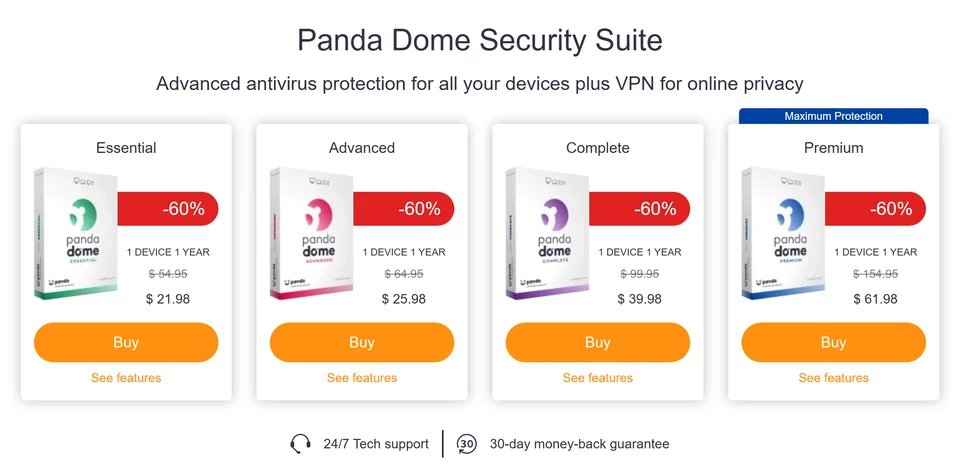
Panda's offer page with US prices (screenshot, October 30, 2026). - 2
Compare the plans
The table under the cards lists what each plan includes, from Essential up to Premium. Each plan has everything in the plan before it.
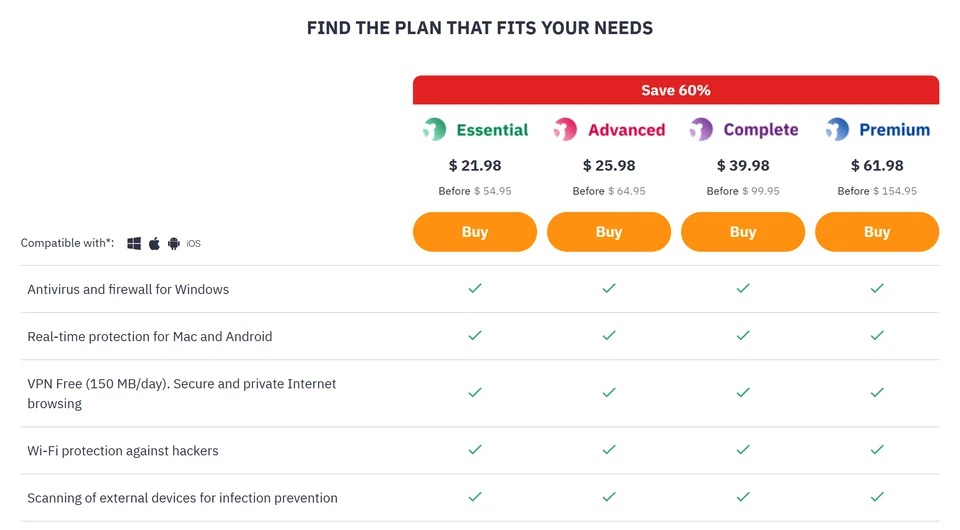
Panda's plan comparison table (screenshot, October 30, 2026). - 3
Set your devices and years
Select See features on a plan. Choose 1, 3, 5 or 10 devices or unlimited, for 1, 2 or 3 years, and the price updates.
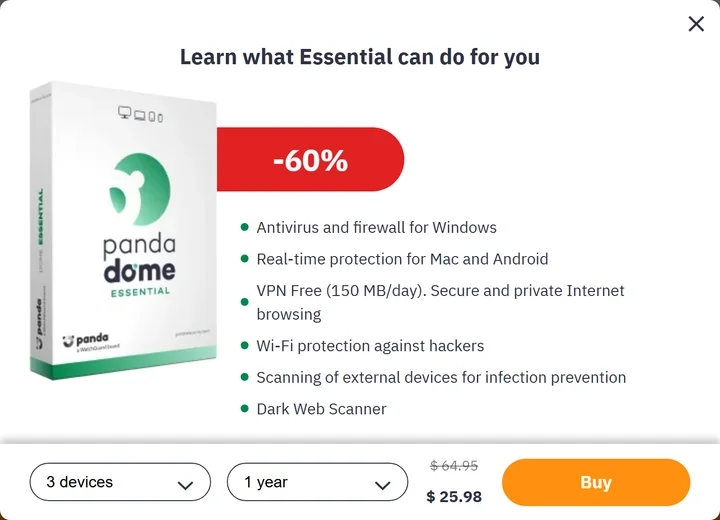
Choosing 3 devices for 1 year on Essential (screenshot, October 30, 2026). - 4
Check the price, then buy
Make sure the sale price is showing before you pay. Panda lists a 30-day money-back guarantee.
About Panda Security
Panda Security makes the Panda Dome range of antivirus and privacy software for home users. Founded in Spain in 1990, it is based in Bilbao and is now a WatchGuard Technologies brand. Panda says more than 30 million people in over 180 countries use its products.
Panda Dome works on Windows, Mac, Android and iOS. Panda says the work is done from the cloud, so you do not have to store files or daily updates on your device. Some tools are Windows only: the firewall, Wi-Fi protection, parental control, file encryption, CleanUp and the update manager.
There are four paid plans, and each one adds to the plan below it. Essential has antivirus, a firewall, a VPN with 150 MB a day, Wi-Fi protection, USB scanning and a Dark Web Scanner. Advanced adds ransomware protection, parental control and identity protection. Complete adds a password manager, CleanUp and file encryption. Premium adds unlimited VPN Premium, Dark Web Monitor, an update manager and technical support 24 hours a day.
Every paid plan can cover 1, 3, 5 or 10 devices or an unlimited number, for 1, 2 or 3 years, and the price changes with your choice. Regular US prices for 1 device for 1 year run from $54.95 for Essential to $154.95 for Premium, and Panda's offer page sells each plan for less with no code to enter.
Panda also offers a free antivirus for Windows and Android, and sells VPN Premium, Family, CleanUp and Password Manager on their own. Paid plans come with a 30-day money-back guarantee and renew automatically unless you turn that off in your Panda account.
What to expect from Panda Security promo codes
- Dated offers — 2 of these Panda Security offers carry a stated end date, shown on the card.
How to save money at Panda Security
- 1Open a live Panda Security deal above to shop it on Panda Security's site; deals have no code to enter.
- 2Percentages on this page span 20% to 60% off — start with the largest and work down, since the biggest discount often carries the strictest conditions.
- 3Compare the offers above before you buy — a percentage-off code usually beats a fixed-amount one as your Panda Security total grows.
Panda Security discount stats
60% OFF
Top discount
Among the Panda Security deals here with a percentage discount, the average is around 48% off.
Why trust SaversPrice?
Every live Panda Security offer on this page was read from Panda Security's own site and carries a Verified badge. 2 of these offers state an end date, shown on the card, and expired ones come off the page.
Panda Security Coupon FAQs
Common questions about saving with Panda Security promo codes
You don't need one for the offers on this page. Panda's offer page applies the discount for you, so the reduced price is already showing on each plan and there is no code to enter.
The best current offer is always at the top of this page. On October 30, 2026 that was 60% off all four Panda Dome plans through October 31, which made them $21.98, $25.98, $39.98 and $61.98 in the US for 1 device for 1 year.
There is nothing to combine on the offer page, because the sale price is already applied and no code is needed. Each add-on, such as VPN Premium, has its own separate discount.
Regular US prices for 1 device for 1 year are $54.95 for Essential, $64.95 for Advanced, $99.95 for Complete and $154.95 for Premium. Panda's offer page sells them for less: on October 30, 2026 they were $21.98, $25.98, $39.98 and $61.98. The price changes with the number of devices and years you choose.
On October 30, 2026 Panda's US offer page showed 3 devices for 1 year at $25.98 for Essential, $35.98 for Advanced, $43.98 for Complete and $69.98 for Premium. Regular prices are $64.95, $89.95, $109.95 and $174.95.
On October 30, 2026 Panda's US offer page showed 5 devices for 1 year at $29.98 for Essential, $39.98 for Advanced, $47.98 for Complete and $73.98 for Premium. Regular prices are $74.95, $99.95, $119.95 and $184.95.
On October 30, 2026 Panda's US offer page showed 10 devices for 1 year at $43.98, $55.78, $73.98 and $113.98, and unlimited devices at $51.98, $61.98, $87.98 and $147.78, from Essential up to Premium. Panda says unlimited devices are subject to reasonable home use, for one customer in one household.
Only slightly. On October 30, 2026 Essential for 1 device was $21.98 for 1 year, $43.58 for 2 years and $63.98 for 3 years, or about $21.33 a year. Premium was $61.98 for 1 year and $185.78 for 3 years, about $61.93 a year. The main reason to choose a longer plan is that you pay once and have no renewal for longer.
Essential suits you if you want antivirus, a firewall and Wi-Fi protection. Choose Advanced for ransomware protection and parental control on Windows. Complete adds a password manager and CleanUp. Premium is the one to pick if you want an unlimited VPN and technical support around the clock.
Each plan includes everything in the plan below it. Essential has antivirus, a firewall, a 150 MB daily VPN, Wi-Fi protection, USB scanning and a Dark Web Scanner. Advanced adds ransomware protection, parental control and identity protection. Complete adds a password manager, CleanUp and file encryption. Premium adds unlimited VPN Premium, Dark Web Monitor, an update manager and premium technical support.
Yes. Panda lists Panda Dome for Windows, Mac, Android and iOS, with real-time protection for Mac and Android. The firewall, Wi-Fi protection, parental control, file encryption, CleanUp and the update manager are Windows only.
Panda lists Windows 11, 10, 8/8.1, 7, Vista and XP (SP3 or higher), Android 5 or higher, macOS 10.10 or higher and iOS 11 or higher.
Yes. Panda Free Antivirus is for Windows and Android and covers 1 device. On Windows it has real-time protection, USB protection, a rescue kit and a multimedia and game mode. On Android it has real-time scanning, a privacy auditor, battery optimization and device location. It comes with a VPN limited to 150 MB a day.
It covers basic protection on one Windows or Android device. You need a paid plan for more devices, for Mac or iOS, or for tools such as the firewall, Wi-Fi protection and parental control.
Yes. Panda offers a free VPN for Windows and Android with 150 MB a day, 1 default location and 1 device. VPN Premium removes the daily limit and adds more than 60 virtual locations on up to 5 devices.
A free PC recovery tool. Panda says you can run an advanced scan or create a rescue USB drive to start and clean a computer that will not boot. It comes with the free antivirus and the paid plans.
A free tool from Panda for when you think your PC is already infected. It runs an in-depth scan and removes the viruses it finds.
We did not find a free trial of the paid plans on Panda's US offer page, which lists a 30-day money-back guarantee instead. Viewed from Europe on October 30, 2026, Panda's free antivirus page also offered monthly plans with the first month free, from €4.45 a month.
Yes. Panda's offer page lists a 30-day money-back guarantee, and its terms give you 30 days from the date you receive the product to cancel without giving a reason. Support and technical assistance products are not refunded once the service has been used.
Tell Panda in writing within the 30 days, by email to customer.service@pandasecurity.com, by fax or by registered mail. Panda says it refunds you within 14 days of receiving your request, using the same payment method.
Yes. Panda says that if you keep your subscription active, it renews automatically when your license expires. You can manage automatic renewal in your Panda account.
Log in to your Panda account, select Products and services, click More info on your product and choose Cancel subscription. Panda says cancelling takes effect at the end of your current billing period.
Sometimes. On October 30, 2026 Panda's renewal page showed a 60% Halloween offer for home users, with a countdown running to October 31. Compare the renewal price with the offer page before you pay.
Yes. Essential, Advanced and Complete include a VPN limited to 150 MB a day with 1 default location. Premium includes unlimited VPN Premium, with more than 60 virtual locations on up to 5 devices. You can also buy VPN Premium on its own.
Yes, if the VPN is all you need. On October 30, 2026 VPN Premium alone was $32.97 for 1 year (was $54.95), against $61.98 for Panda Dome Premium for 1 device. Panda Dome Premium also includes the full security suite.
Complete and Premium include it. You can also buy Password Manager on its own, which was $31.96 for 1 year on October 30, 2026 (was $39.95).
Advanced, Complete and Premium include parental control for Windows. For phones and tablets, Panda sells Panda Dome Family, which can block or limit apps, set time limits, send alerts when your children reach or leave a place and show their location.
CleanUp deletes unnecessary files and speeds up Windows start-up by enabling only the programs the system needs. It comes with Complete and Premium, or you can buy it on its own.
Dark Web Scanner is an email checker in all Panda Dome plans that shows whether your email account has been exposed on the dark web. Dark Web Monitor comes with Premium; it keeps watching and emails you if your details appear.
Panda says it scans your computer for vulnerabilities and downloads the patches needed to keep your operating system and programs up to date. It comes with Premium and works on Windows.
Panda says it protects your personal data and sensitive files as an extra layer against threats that try to access, steal or damage them. It comes with Advanced and the plans above it.
Complete and Premium include file encryption for Windows, so you can protect confidential files, along with file shredding for deleting them for good.
Yes. The multimedia and game mode lets you play or watch content without interruptions from your antivirus. It is part of the free antivirus and every Panda Dome plan.
Yes. Panda's free Android app can show a lost or stolen phone or tablet on a map, and your Panda account has an anti-theft module for finding your devices.
Advanced, Complete and Premium add dedicated anti-ransomware protection on top of the real-time antivirus in Essential.
You choose when you buy: 1, 3, 5 or 10 devices, or unlimited, for 1, 2 or 3 years. Panda says unlimited devices are subject to reasonable home use, for one customer in one household.
Panda says you can manage devices on the Devices tab of your Panda account, where you can rename or delete them and unlink licenses from specific devices.
Sign up or log in at my.pandasecurity.com, add your product with your activation code, then download, install and activate it. Repeat this on each device you want to protect.
Yes. Panda Security was founded in Spain in 1990 and is a WatchGuard Technologies brand. It is based in Bilbao and says more than 30 million people use its products.
SE Labs gave Panda Dome a 98% Total Accuracy Rating for April to June 2026, made up of 95% for protection and 100% for legitimate software. In AV-Comparatives' Real-World Protection Test for February to May 2026, Panda Dome Advanced blocked 386 of 400 test cases (96.5%), with 27 false alarms.
WatchGuard Technologies. WatchGuard announced the deal in March 2020, and Panda now describes itself as a WatchGuard Technologies brand.
Panda Security, S.L.U. is based at Gran Vía Don Diego López de Haro 1, 48001 Bilbao, Spain.
Panda's US offer page lists +1 (917) 284 9439, with calls 24/7 for a free diagnosis. Customers can also use the Support tab in their Panda account, and the customer service email is customer.service@pandasecurity.com.
Panda's offer page lists 24/7 technical support, and Panda Dome Premium includes technical support 24 hours a day, 365 days a year, with help for peripherals such as cameras and printers.
We did not find one on Panda's site on October 30, 2026. You do not need to verify anything to get the prices on the offer page.
Panda Dome is for home users. For business, Panda's site points to WatchGuard, which sells endpoint security, network security, AuthPoint MFA and Secure Wi-Fi. The offers on this page are for home plans.
As of October 30, 2026, there are no Panda Security promo codes, but 14 deals are available, with discounts up to 60% off. They are all listed above.
Panda shows prices for your region. On October 30, 2026 the 60% offer showed in the US, Canada, Australia and Spain, while the UK and Brazil saw their own fixed prices, so the amount can differ from the US prices on this page.
Panda Security Tips & Comments
Have a Panda Security tip or did a code work for you? Share it with other shoppers.
No comments yet — be the first to share a Panda Security tip!
Savings guides & tips
Expert guides from the SaversPrice team to help you save even more — on Panda Security and everywhere else.


Popular stores & categories
Slack CouponsWooCommerce CouponsBigCommerce CouponsShop Pay CouponsMonday CRM CouponsHubSpot CouponsCreative Market CouponsDribbble CouponsAdobe CouponsDropbox CouponsEvernote CouponsShopify CouponsProductivity Apps Promo CodesBusiness Software Promo CodesDomains & Hosting Promo CodesWeb Hosting Promo CodesWebsite Builders Promo CodesEcommerce Platforms Promo CodesDesign Tools Promo CodesCreative Software Promo Codes